

FileMaker 2025 has landed!
FileMaker 2025 is here, also know as FileMaker 22. While there’s a lot of focus on the new AI features, there are several updates that improve everyday development in a more down-to-earth way. Whether you’re building something new or just maintaining an existing system, a few of these changes might save you time (or frustration).
Here are some of the highlights that stood out to me—features that are easy to use right away and don’t require a big learning curve.
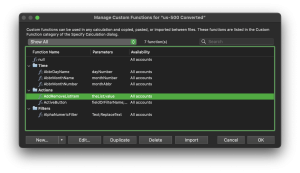
Custom Function Folders
You can now organize custom functions into folders. If you’ve ever scrolled through a long, unorganized list of functions, this is going to be a big help. Group them however you like—by purpose, by integration, or by project. It works a lot like the folder system for scripts and layouts. There is a noticeable difference in FileMaker 2025 when working in larger files.
Collapse Script Sections
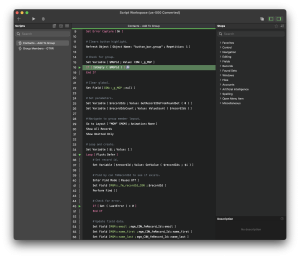
In Script Workspace, you can now collapse If, Loop, and Transaction lines. It’s not a flashy change, but it makes long scripts way easier to navigate. You can quickly skim a script’s structure, hide sections you’re not working on, and avoid getting lost in the details.
FileMaker 2025 Updated Look on macOS
The macOS version of FileMaker got a visual refresh. New icons, updated layout mode styling, and better use of system colors. It doesn’t change how things work, but the interface feels cleaner and more modern. It also helps newer users feel a bit more at home when they’re just getting started.

Add or Remove Objects from Groups (Without Breaking Everything)
This one’s small but super handy. FileMaker 2025 allows you to add objects to a group or remove them without having to ungroup everything first. It keeps your layout structure intact and makes adjusting grouped elements a lot less tedious—especially if you’re working with portals, tab panels, or other nested objects.

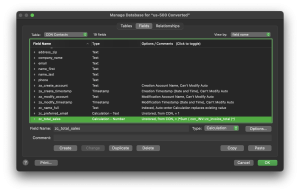
Field Calculation Data Types Now Shown in Manage Database
When viewing calculation fields in Manage Database in FileMaker 2025, you’ll now see the defined data type (Text, Number, Date, etc.) listed directly in the Type column. This saves time when reviewing field structures, especially in complex files. Since you no longer need to open each calculation to confirm its output type, you can see it at a glance.
In Conclusion: FileMaker 2025 is Loaded with Small Changes with Big Benefits
There’s more in the full release, including new AI tools to incorporate into your work. But beyond AI, these changes are solid quality-of-life improvements that most developers will notice right away. Don’t forget to go see James’ notes on the new features. Here is his blog on JSONParse. Claris FileMaker Pro 2025 – JSONParse
If you haven’t had a chance to look around in FileMaker 2025 yet, these are great features to start with.


