

Surcharge logic is one of those things that always starts simple… and then becomes complicated the moment you support multiple card types, ACH fees, or inclusive calculations. Most systems end up with surcharge rules duplicated across scripts, fields, and UI logic.
PaymentSurcharge solves this by providing a single, predictable JSON object that returns both exclusive and inclusive surcharge calculations in the same structure used in the popular TaxSplitAll custom function.
This gives developers one surcharge engine that works consistently across UI workflows, integrations, and accounting.
Why Use This Surcharge Function?
Developers often run into these problems:
- Exclusive vs. inclusive math handled differently in different scripts
- Card-type rules scattered throughout solutions
- ACH fees coded separately
- “Allowed” logic varies by merchant or state
- Duplicated math causing inconsistencies
PaymentSurcharge consolidates all of this into one reusable JSON output.

Function Parameters
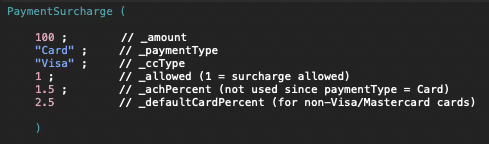
- _amount: Total payment amount (base for exclusive; may include fees in inclusive logic)
- _paymentType: Payment method (e.g., Card, ACH, Cash, Check)
- _ccType: Card brand (Visa, Mastercard, Amex, Discover, etc.)
- _allowed: 1 to allow surcharge calculation; 0 forces fee to 0
- _achPercent: ACH surcharge percent (e.g., 1.5 or 0.015)
- _defaultCardPercent: Default percent applied to all non-Visa/Mastercard card types
What PaymentSurcharge Returns
Every call to the function returns both surcharge modes:
- Exclusive — fee added on top
- Inclusive — fee extracted from a fixed total
Example Output
Card & ACH Logic
PaymentSurcharge applies the following rules:
- Visa: 3%
- Mastercard: 4%
- All other cards: _defaultCardPercent
- ACH: _achPercent
The developer controls whether surcharges are allowed via the _allowed parameter.
Inclusive Mode Explained
Exclusive mode is the standard approach:
base + fee = total
Inclusive mode solves a different real-world need:
When a customer wants to pay a specific total amount, and the system cannot exceed that number by adding fees.
Examples:
- Customer says: “Charge exactly $100 — not $100.30.”
- Invoices that legally cannot exceed their stated total
- Processor limitations
- States that prohibit adding fees on top of displayed amounts
Inclusive mode extracts the fee from inside the total:
base = total / (1 + rate) fee = total – base
This prevents overcharging and ensures compliance across different workflows.
Why Provide Both Modes?
Developers routinely need both:
- UI display
- Checkout screens
- Refund and dispute logic
- Compliance or disclosure requirements
Returning both modes every time gives you a complete surcharge picture in one place.
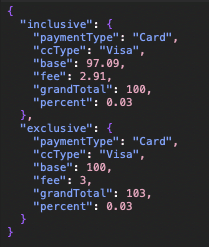
Example
Input
Result
Why Developers Will Appreciate This Function
- Eliminates duplicated math in scripts
- Produces clear, predictable JSON output
- Works cleanly for UI
- Easy to maintain and extend
- Logic lives in one central place
PaymentSurcharge becomes your single source of truth for surcharge logic.
Ready to start using this in your own builds? Give PaymentSurcharge a try and see how much cleaner your scripts become — and if you have questions or want help integrating it, just reach out.


