

Managing sales tax in complex environments can be challenging—especially when multiple rates, mixed taxability, and inclusive vs. exclusive pricing all intersect. In real-world systems, these tax rates are often driven by external tax engines to ensure accuracy and compliance.
In our Claris FileMaker solutions, we use the TaxJar api to dynamically retrieve the correct tax rates for city, county, special district, and state based on location. TaxJar provides verified, up-to-date tax jurisdiction data, which we then pass into the TaxSplitAll custom function for precise, detailed calculations.
Together, TaxJar + TaxSplitAll gives your Claris FileMaker system a reliable and transparent tax engine.
What the Function Does
Inclusive Mode
- The total already includes tax.
- The function back-calculates the embedded tax, proportionally distributes it across all tax jurisdictions, and returns net and tax amounts.
Exclusive Mode
- The tax is added on top of the base total.
- The function calculates the tax amounts for each jurisdiction and produces a clean itemized JSON result.
It also supports:
- Tax exemptions
- User-controlled outside-city logic (users can manually override whether the transaction is “inside” or “outside” city limits)
- Partially non-taxable totals
- Four independent tax rates: City, County, Special District, State
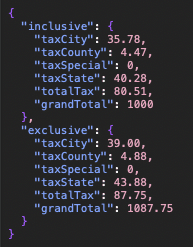
The result of every calculation—both inclusive and exclusive—is returned in a single JSON object, making it easy to parse the values.
How TaxJar Fits In
Your FileMaker system uses TaxJar to retrieve:
- The exact jurisdictional tax rates
- The composite rate for the transaction
- Whether special district taxes apply
The “outside city limits” flag is intentionally left up to the user.
- TaxJar determines what the city tax rate is, but the decision to apply or exclude city tax is user-driven.
Why?
- Some companies need to override city taxation manually.
- Some depend on warehouse vs. delivery locations.
- Some have mixed behavior depending on internal policy or contract terms.
So your system provides a clear toggle that allows a user to say:
“This transaction should be treated as outside city limits, even though TaxJar provides a city rate.”
This gives the system both accuracy and flexibility.
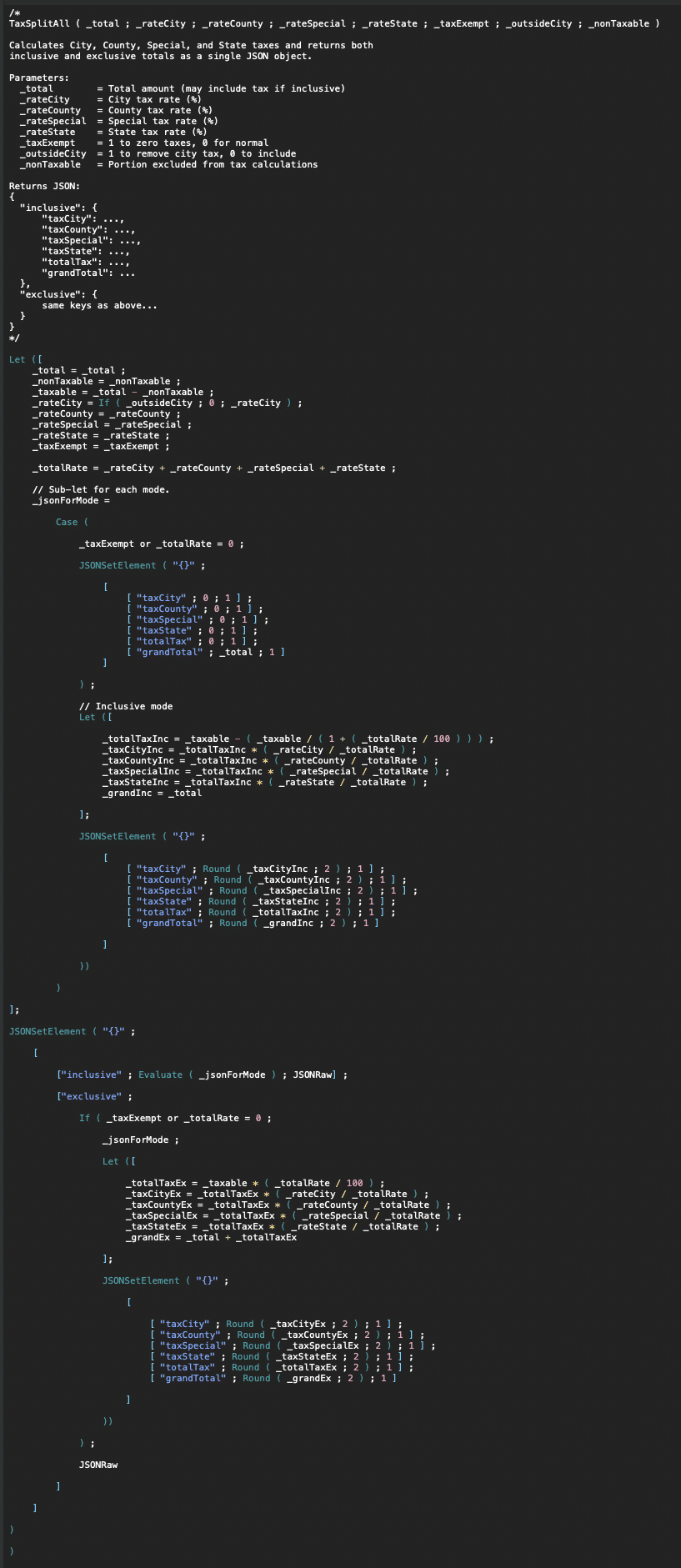
Function parameters.
- _total: Total payment amount (may include tax if using inclusive logic)
- _rateCity: City tax rate (%)
- _rateCounty: County tax rate (%)
- _rateSpecial: Special district tax rate (%)
- _rateState: State tax rate (%)
- _taxExempt: 1 to make the transaction fully tax exempt; 0 for normal tax logic
- _outsideCity: 1 if the transaction is outside city limits (city tax is removed); 0 to apply city tax
- _nonTaxable: Amount excluded from tax (for example, exempt services, certain line items, or fees)
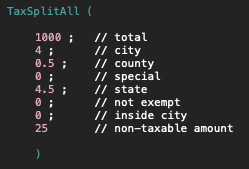
Example
Input
Result
Why This Matters
TaxSplitAll is ideal for FileMaker systems that require:
- Total transparency in tax breakdown
- Multi-layer tax jurisdiction handling
- Easy integration with accounting platforms
- Support for partial exemptions and non-taxable services
- A unified JSON structure for scripts or layouts
By combining TaxJar’s accuracy with user-level control and FileMaker-driven logic, your tax workflow becomes:
- Auditable
- Maintainable
- Flexible
- Always up to date
If you’d like help integrating TaxJar, refining your tax engine, or extending this JSON logic into invoices, reach out anytime. We can review your environment, streamline your tax flow, and make sure your FileMaker system is ready for any tax scenario.


